Wednesday, September 24, 2014

[Outlook] How to add gmail account (Google) Type: IMAP

Before adding the Gmail Account on MS Outlook, you have to enable IMAP type on Gmail.com.

How to enable IMAP on Gmail.com 

On the right side, click on an icon ‘Configuration’ 
Choose ‘Settings’
Click ‘Forwarding and POP/IMAP’
Enable IMAP 
Save Changes


Enabled IMAP

How to add an Gmail account on MS Outlook (IMAP) 

1. File > info > Add Account


File > Info > Add account

2. Choose Manually configure server setting or additional server types


 3. Choose 'Internet E-mail'


 4. Type your information
      Account Type : IMAP
      Incoming mail server: imap.gmail.com
      Outgoing mail server (SMTP): smtp.gmail.com
      Click ‘More Settings ...’


Click 'More Settings'

5. On the Internet E-mail Settings window, Tab: Outgoing Server 
     Check ‘My outgoing server (SMTP) requires authentication’


Check ‘My outgoing server (SMTP) requires authentication’
Then, go to tab: advanced

6. Tab: Advanced
    Incoming server (IMAP) : 993 (SSL) or 143 (None)
    Outgoing server (SMTP) : 25 or 465 (TLS)
 

Click 'OK' 

7. Click on 'Test Account Settings...'

Test Account Settings

Testing

 8. The Status would has shown ‘Completed’


Finish


[Outlook] How to restore .pst file on MS Outlook (Inbox, Sent item, Contacts, etc.)

To restore the data obtained by importing .pst file. The data was restored to MS Outlook. The PST file should be kept on D:\.


How to restore *.pst file (Inbox, Sent item, Contacts, etc.)


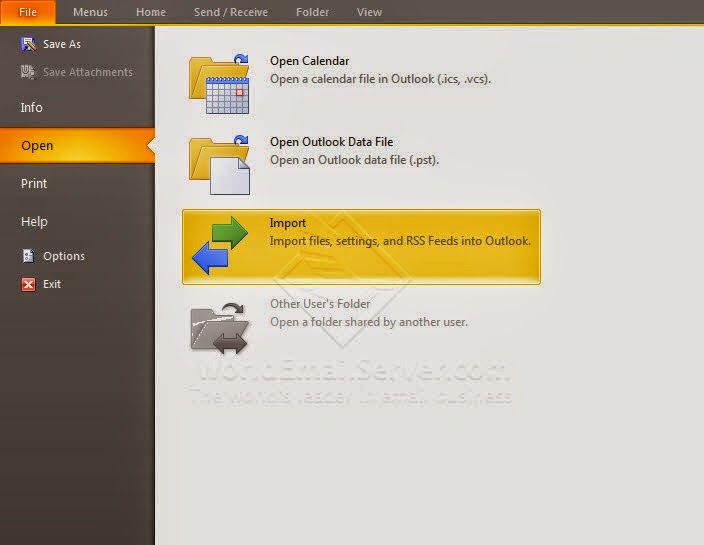
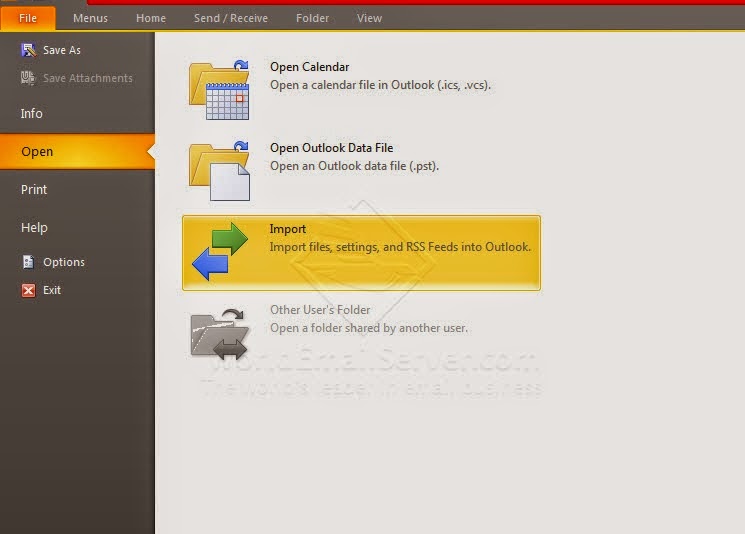
Go to File > Open, click ‘Import’

Import files

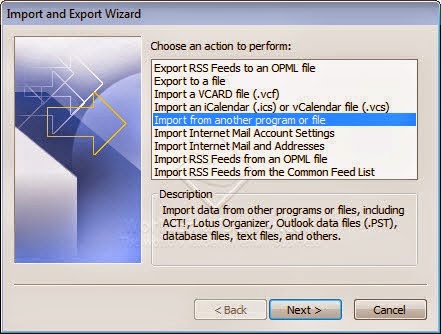
On the ‘Import and Export Wizard’ window, click ‘Import from another program or file’

Import from another program or file

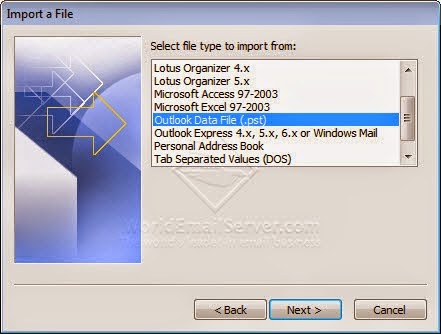
Choose 'Outlook Data File (.pst)', then click 'Next'

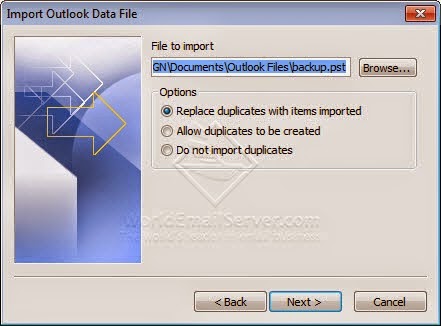
Options: Replace duplicates with items imported

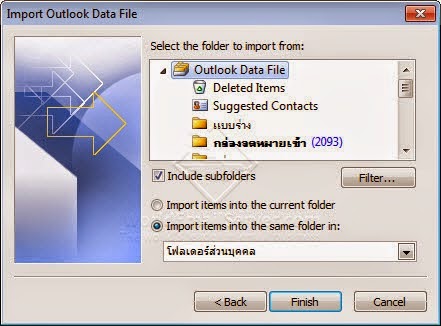
Import items into the same folder in:

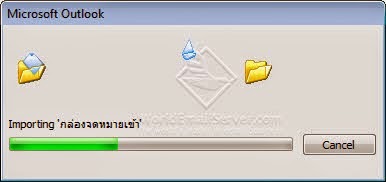
Importing .pst file

Related Article:

[Outlook] How to backup email messages (Inbox, Sent item, Contacts, etc.) on MS Outlook

[Outlook] How to backup email messages (Inbox, Sent item, Contacts, etc.) on MS Outlook

Backing up data is first important feature that the beginning of the users have to know. Most people overlook that they will not loss their data until the unexpected situation has occurred. As part of the MS Outlook program provides a tool that can backup all folders, it has been designed to prevent your important data getting lost

How to Backup emails (Inbox, Sent item, Contacts, etc.)


Open the program, go to File in the menu, click ‘Open’ > choose ‘Import and Export’.

Import/Export

On the next page of the Import and Export Wizard window appears ‘Export to a file’


Export to a file

Outlook Data File (.pst)

Select a head of the folders, click 'Next'


Options: Replace duplicates with items exported

Exporting to .pst file

Related Article:

[Outlook] How to restore .pst file on MS Outlook (Inbox, Sent item, Contacts, etc.)

Thursday, September 18, 2014

[iOS] How to change an email password on iPhone or iPad.

How to change an email password on iPhone or iPad (iOS)

Many people who can not send email from the iPhone or iPad, but can receive emails normally , these problems are caused by the following reasons.

1. Email password has been changed, but the user didn’t change the password on iPhone or iPad, usually caused by input password is incorrect.
2. Insert the wrong password, while you are adding an account.


The user name or password for 'SMTP' is incorrect.


How to change the email password on iPad

Go to 'Settings'.

Mail, Contacts, Calendars > Account

Tap on 'SMTP'

Tap your SMTP server

Change your correct password
Tap 'Done'


MailDee.com Team

Wednesday, September 3, 2014

[Outlook] How to create an email signature on MS Outlook 2007, 2010, 2013


An Email signature on Microsoft Office Outlook


Using an email client software, you might contact to many people such as partners, customers, suppliers. They should know who you are, where you are from, and they have been received good image from you.

The signature on MS Outlook performs your information that you need to show other people. For example, using signature on MS Outlook performs your name, surname, company, email address, mobile phone, website, etc. Furthermore, you can create your good and quality image of your company that your company is reliable.


For example,

-------------------
Regards,
Name Surname
Position
Company Co., Ltd.
Tel : +66 (02) - 111-1111
Email: name@yourcompany.com

Signature on MS Outlook


MS Outlook 2007
On the MS Outlook
Click Tools --> Options --> 'Mail Format' tab
Click 'Signature' button.
Click New signature, type a name for a signature.
Type your signature on 'edit signature', click 'OK'


MS Outlook 2010

MS Outlook 2013


Signature > Signature


Click New signature, type a name for a signature.


Type a name for a signature and click 'OK'


Type your signature.
Example: Best regards, Steve K.
Click 'OK'

Your email signature has been set. 

Tuesday, September 2, 2014

5 Reasons why should we separate email hosting from web hosting.

Separate your hosting between email and web.


From my long experience, the writer used to talk with users using email hosting, I has known their problems that they always found, for example, do not receive email messages from the sender, server has been down.

90% of users find problems, used email hosting which is a function of web hosting. So, there are five reasons why we should separate email hosting from web hosting.

1. Web hosting service provider is not expert at email server technical knowledge.

Many providers selling web hosting who are well-known in their country as a brand or big enterprises of their country might not know and comprehend an email hosting process because most users have problem with their service and the problems do not be solved clearly.

2. The main process of web hosting is website only.

Web hosting was particularly created for website, email is just a function of the server. Therefore, its efficiency could not compare with mail server.

3. Email hosting is important than web hosting in business.

People might accept with downed server but email hosting, they can’t bear it. Businesses have to contact via email all times.

4. Email hosting service provider should has English skill.

Sending and Receiving messages to the destination which its server locates in foreign countries such Gmail, Hotmail, Yahoo, etc. and some issues have been solved by providers whom owned the server in other country. You have to communicate with English language to them during the issues.

5. Email hosting is a part of IT technical knowledge.

The process of email hosting is complex. Creating the quality email hosting should have other system integrate to the server such as Spam filter software, Users management, Domestic and International network knowledge, Anti Virus software. The developer should have enough experiences to manage these system.


Therefore, if your company need to find the quality email hosting service, you should decide the provider who has many experiences and high technical knowledge and the email hosting  should separate from web hosting.

Monday, September 1, 2014

What's the function of mail server?

The function of mail server is sending and receiving email messages instead of letters, it’s a very important part of organisations.

How does ‘Mail Server’ work?

  • Receive emails into their servers such as text messages, photos, attach files from the sender.
  • Send text messages, photos, attach files from users’ computer using the mail server sending out the emails to the recipients.
  • Keep users’ data to the server as a hard disk, for example, keeping text messages, photos, attach files. The hard disk would have disk space over computer’s hard disk
  • Find email messages since the past to the present.


What is the main function of mail server for organisation? 

In an organisation, there is active users sending a large numbers of email messages. The mail server is keeping sent and received emails, it also has high security with the server because each business is not allowed to open the essential data.

Should I rent email hosted or make a mail server? 

If your business is not big like a bank and has thousands of employees, renting a mail server service with a provider is better than making your own mail server. Because of making the mail server has to maintained closely with many problems, you may not use email effectively.


Technology Land Co., Ltd.
Mail server services for business