Working in the present, email becomes more popular and more important for communication. Choosing the provider, should notice the email system which can set up your business name behind "@": name@yourcompany.com, for increasing more confident with your clients. Furthermore, email system should be stable, speedy, and available on many devices such as iOS: iPhone, iPad, and iPod (Apple).
 |
| Tap "Settings" |
 |
| Tap "Mail, Contacts, Calendars" |
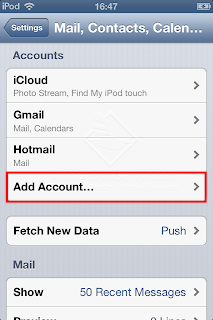 |
| Tap "Add Accounts..." |
 |
| Tap "Other" |
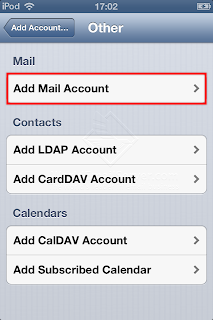 |
| Tap "Add Mail Account" |
 |
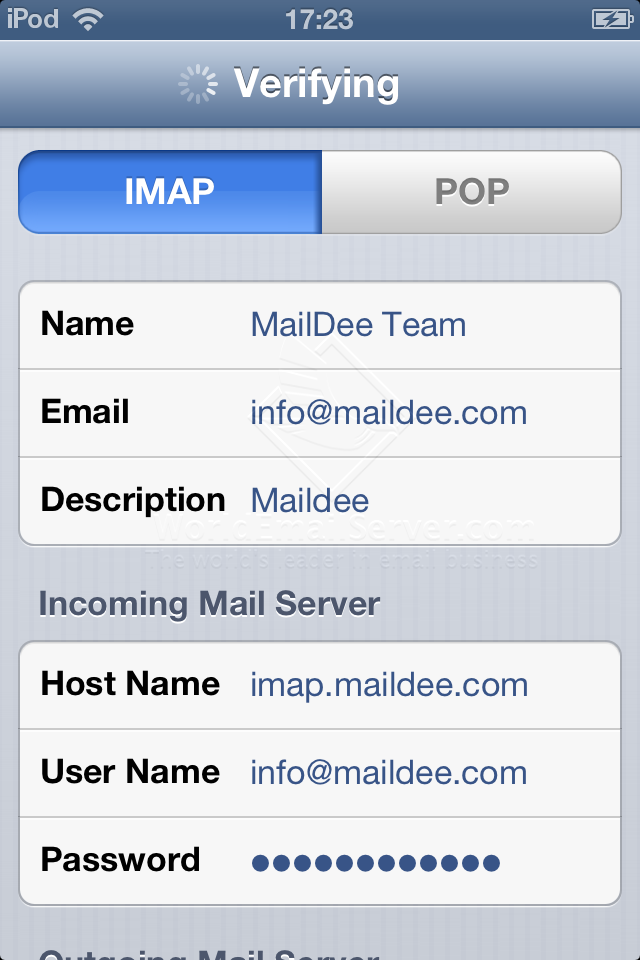
Type your name, email account and password. (English only)
Description: as you prefer |
 |
Type your information as below:
Incoming Host name: imap.(Domain Name).com
Outgoing Mail Server Hostname: smtp.(Domain Name).com
User Name: Your email account |
 |
| Tap "Next" |
 |
| Adding the account has completed, tap "Save" |
 |
| Your new email account will be shown on your device. |
 |
| Your new email account will be shown on your Mailboxes. |