Nowadays, communication expand to everywhere in this world. Wherever you are, whatever you do, you can access to your email every devices such as iPhone, iPad, iPod, etc.
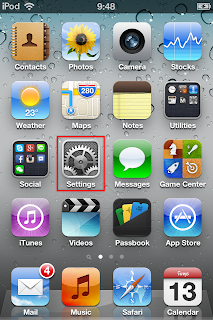.PNG "Tab 'Settings'") |
| Tab "Settings" icon |
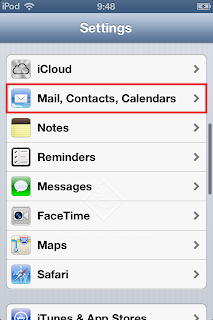.PNG "Mail, Contacts, Calendars") |
| Tap "Mail, Contacts, Calendars" |
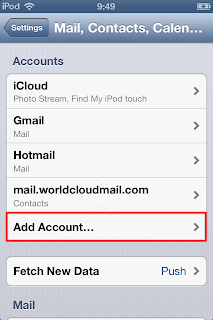.PNG "Add Account...") |
| Tap "Add Account..." |
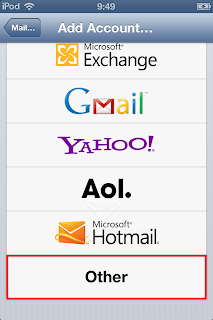.PNG "Other") |
| Tap "Other" |
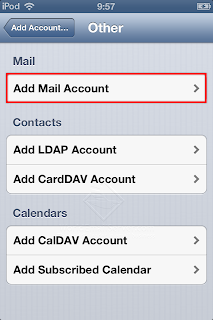.PNG "Add Mail Account") |
| Tap "Add Mail Account" |
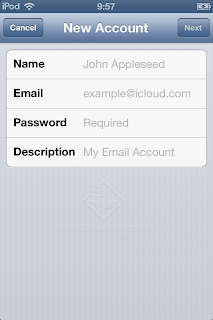.PNG "New Account") |
| Type your name, email, password and description. |
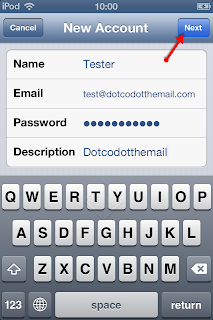 |
| Tap "Next" |
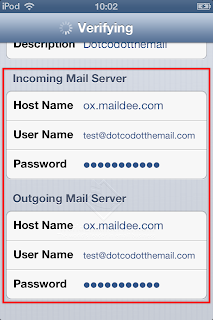.PNG "Type the information") |
Incoming Mail Server
Host Name: ox.maildee.com
User Name: your email account
Password: your password
Outgoing Mail Server
Host Name: ox.maildee.com
User Name: your email account
Password: your password |
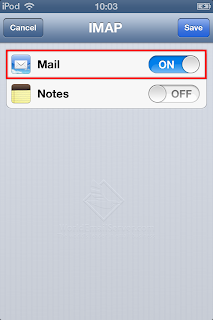.PNG) |
| Flick the status on and tap Save. |
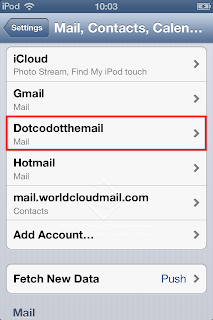.PNG "New account is added") |
| Tap your email account. |
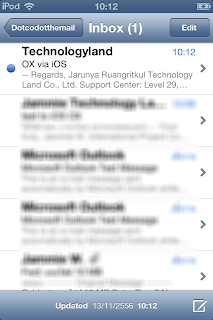.PNG "Your inbox") |
| Messages were shown on your inbox. |


.PNG "Tab 'Settings'")
.PNG "Mail, Contacts, Calendars")
.PNG "Add Account...")
.PNG "Other")
.PNG "Add Mail Account")
.PNG "New Account")

.PNG "Type the information")
.PNG)
.PNG "New account is added")
.PNG "Your inbox")