Showing posts with label setup email android. Show all posts

Thursday, April 17, 2014

[MD OX] How to add account and setup email on Smartphone (Android-IMAP): Samsung, LG, HTC, etc.

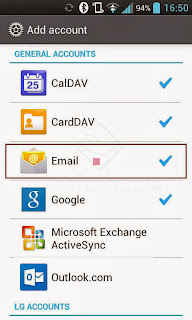
Tap "Email"

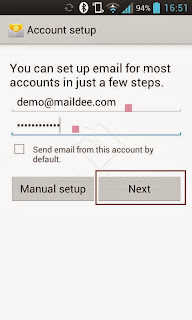
Type your email address and password

Tap "Manual setup"

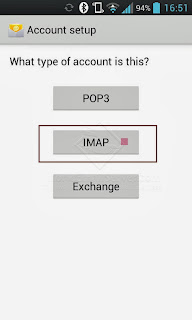
Tap "IMAP account"

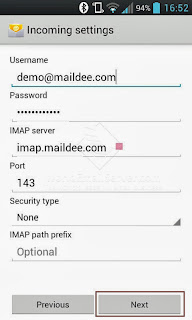
User Name: your email account
Password: your email account password
IMAP server: ox.maildee.com Port: 143
Security type: TLS (Accept all certificates)
Tap "Next"

Checking incoming server settings...

SMTP server: ox.maildee.com Port: 26
Security type: TLS (Accept all certificates)
User Name: your email account
Password: your email account password

Checking outgoing server settings...

Choose email check frequency and tap "Next"

Type your account name and your displayed name
Then, tab 'Done'

Go to your inbox

How to remove an account. Go to setting...


Tab your email account

Tab 'OK'

Wednesday, December 4, 2013

[MD] How to add a business email account on Android: Samsung, LG

MailDee.com, supported to Android such as Samsung, LG, setting up as below:
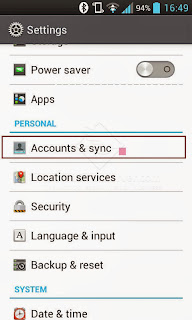
Go to "Settings", tap "Accounts & sync"

Tap "Email"

Type your email account and password.

Tap "IMAP"

Set the incoming server name like the screen.
IMAP server: imap.(your domain name).com Port: 143
Then, tap "Next"

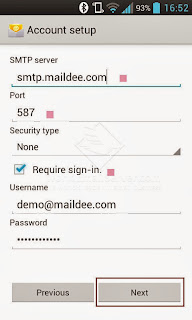
SMTP server: smtp.(yourdomainname).com Port: 587
Tick "Require sign-in."

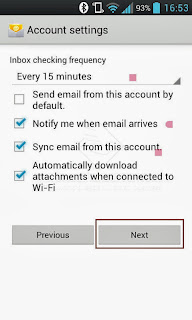
Tick the frequency and tap "Next"

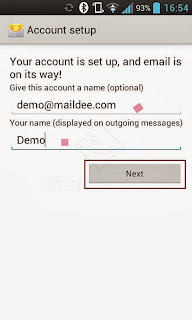
Type this account a name and your name (displayed on outgoing messages)
Tap "Next"

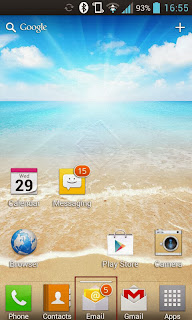
Your email account was successfully added.

The Article was created by MailDee.com, the business email server/hosting provider.